
Microsoft365 (email, Sharepoint, Teams)
Based on the Campus Agreement concluded between Microsoft and the Ministry of Education, Science, Research and Sport of the Slovak Republic, UCM is authorized to provide its students, teachers, and other staff members with access to licenses that grant the use of Office 365 ProPlus applications, such as email within the @ucm.sk domain, desktop and online versions of Word, Excel, PowerPoint, and more.
Basic Information
Login credentials:
-
Employees: personal number@ucm.sk (e.g., 123456@ucm.sk); password: same as for your desktop PC, or your birth registration number (without the
/slash) -
Students: IDO@ucm.sk (e.g., 2998569@ucm.sk); password: birth registration number (without the
/slash)
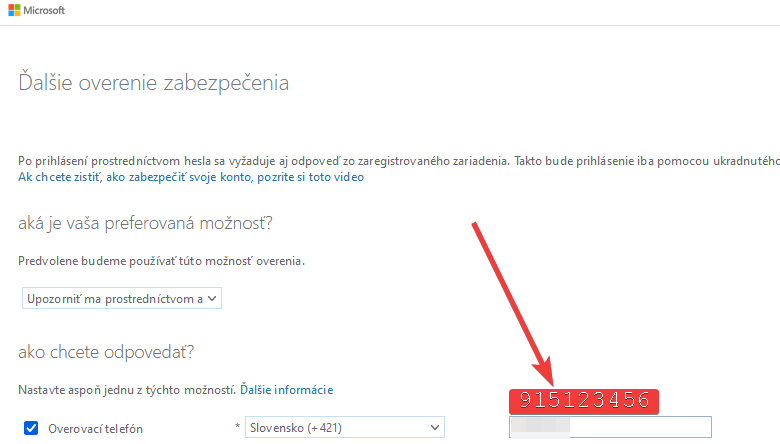
It is necessary to set up the Microsoft Authenticator mobile app via https://aka.ms/mfasetup, which you will need for self-service password reset, as well as for signing in. We also recommend setting up identity backup within the app.
Accounts are active from September 1 of the respective academic year if full enrollment was completed by August 31. Otherwise, the account becomes active from the date of full enrollment in AiS2 + 3 business days.
Login pages:
-
Email: https://outlook.office.com/
-
Teams: https://teams.microsoft.com
-
SharePoint: https://ucmtt.sharepoint.com
All changes (study validity, surname changes, study program changes, etc.) are applied to Office 365 within 3 business days of the change being processed in AiS2 (for students) or the HR system (for employees).
Restrictions:
-
IMAP email access: not allowed
-
POP3 email access: not allowed
-
Verification via the Microsoft Authenticator mobile app may be required during login
-
Verification via the Microsoft Authenticator mobile app is required during password reset
Format of email addresses (the email address is not the login username!):
-
Employees:
firstname.lastname@ucm.sk(in case of duplicate names/surnames, a number is appended to the end of the address) -
Students:
lastnameX@ucm.sk, where X is a number; the exact form of your address can be found in AiS2.
Manuals
Common (for both employees and students)
-
Setting up authentication phone via the link: https://aka.ms/mfasetup
For Employees
-
Outlook – Account creation (if you want to use Microsoft Outlook to manage your email; on work PCs at UCM, this operation is handled by CIKT)
-
Outlook – Automatic replies / Out of Office (if you are going on vacation or sick leave, add information for people who might contact you during that time)
-
Outlook – Replying from a shared mailbox (if you manage multiple mailboxes and want the reply to be sent from a different address)
For Employees (Teachers) and PhD Students
Personal Data Protection
Your data (emails, files in OneDrive storage, and other application files) are stored on servers located within the EU.
Be cautious about what information about yourself you publish in your profile, as it is publicly accessible / visible to all UCM employees and students. The authentication phone number is not displayed in the profile.
Frequently Asked Questions (FAQ)
I forgot my password, what should I do?
If you set up an authentication mobile device before forgetting your password, you can reset the password yourself by selecting the "Forgot my password" option on the Office 365 login screen and following the on-screen instructions. If you have not set up the Microsoft Authenticator mobile app, send a password reset request to servis@ucm.sk from the email address registered in your AiS2 profile or HR records.
Who can use Office 365 services?
Any employee with a valid employment contract and any student with valid enrollment (Bachelor's, Master's, or PhD) at UCM.
Students with interrupted/suspended studies and students who do not have full enrollment recorded in AiS2 are not entitled to use Office 365 services.
What is included / available?
-
Online versions of Word, Excel, PowerPoint, OneNote, and Outlook.
-
PC/Mac desktop versions of the above, plus Publisher and Access, with the option to install them on up to 5 devices.
-
Additional online apps: https://aka.ms/skolstvo
What do I need to use Office 365 services?
You need your personal number (for employees) or IDO (for students) and your password.
If you have multiple employments or study programs, only one personal number/IDO can be used for Office 365 access. Contact servis@ucm.sk for further details.
Can I have a different email address than the one assigned to me?
No.
In the event of a surname change, an additional address with the new surname will automatically be assigned to you, while the address with the old surname will remain valid as well. Report surname changes to the HR and Legal Department (for employees) or the Study Department (for students).
How do I forward my email to another address?
Email forwarding is not permitted.
What are the terms of use for desktop versions of apps like Word, Excel, PowerPoint, and Outlook?
These applications check license validity over the internet. If verification fails for 30 consecutive days, the applications will switch to a read-only mode (files can only be viewed, not edited).
Applications can be installed on up to 5 computers (work or personal). License management is accessible via your Office 365 portal.
What happens to my data if I interrupt my studies/employment?
For students with interrupted studies, students in transition periods (e.g., completed Bachelor's degree and not yet fully enrolled in Master's, similarly Master's → PhD), and employees in transition periods (without an active contract during summer holidays, or on maternity/parental leave), data is retained, but Office 365 services cannot be accessed (login will be disabled).
What happens to my data when I successfully graduate?
Graduates retain only their email address, with an incoming restriction allowing mail to be received only from @ucm.sk addresses. Outgoing mail is not restricted.
I have an issue, who should I contact?
Support for Office 365 is provided by the Centre for Information and Communication Technologies (CIKT UCM) at servis@ucm.sk. You are required to communicate from your official university-assigned email. If you cannot access your assigned email, communication from the private email address registered in AiS2 or HR records is accepted.
I have a Mac and Office does not allow me to edit documents.
Try checking, for example: https://appuals.com/fix-account-doesnt-allow-editing-on-a-mac/